Our Rover can move and collect. Now the team needs different roles.

Rover
Shared position, movement and backpack
ScoutRover / CargoRover
Add role-specific information
Keep the common operations
Keep the common operations
先保留已有能力,再增加角色差异。
第 10 讲 · 讲义
课件的每一页,配上讲这一页时说的话。幻灯片是网页原生渲染的,文字可以选中、可以搜索,也可以直接打印。

上一讲实现了能移动、付款和拾取物品的Rover。本讲继续这个项目,增加不同角色,用常用Python操作访问对象,再把定义整理成模块。学习目标是理解这些语言机制怎样工作,图形程序帮助观察结果。

Our Rover can move and collect. Now the team needs different roles.
Rover
ScoutRover / CargoRover
先保留已有能力,再增加角色差异。
回到上一讲的探险队。已有角色都能保存自己的坐标和物品。现在增加侦察和运输角色,希望它们保留移动和拾取能力,同时显示各自的信息。我们将持续修改这一个项目。
Move any rover; compare the scout’s range and each backpack.
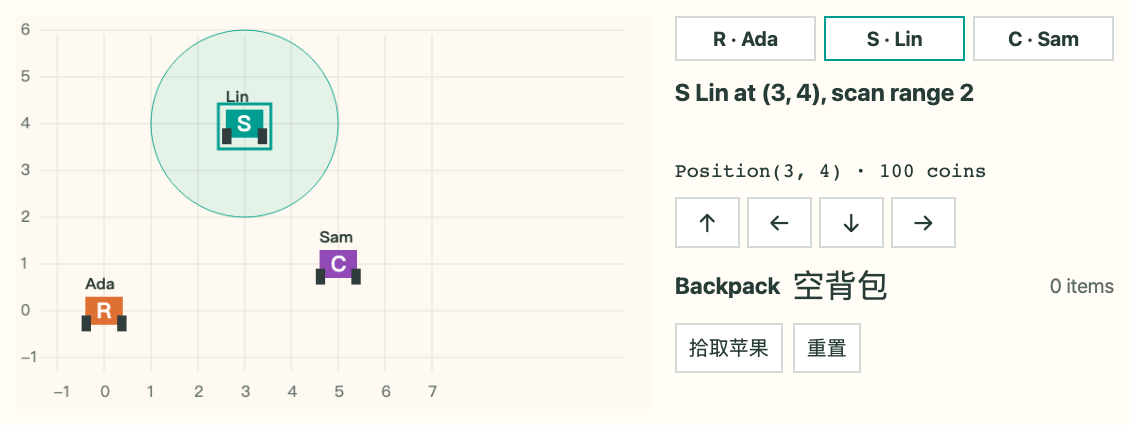
选中Ada、Lin或Sam,用方向按钮移动。Lin显示侦察范围;只让Sam拾取苹果,其他角色的背包保持原样。三种角色共用移动和拾取接口。下载包提供对应的Python源码和运行命令。
Three copied move methods create three places to maintain.
class ScoutRover:
    def __init__(self, x, y):
        self.x, self.y = x, y
    def move(self, dx, dy):
        self.x += dx
        self.y += dy
Common
Different
Can we keep one common implementation?
新角色需要共同能力,也需要自己的实现。
最直接的办法是复制Rover再改类名。这样坐标和移动逻辑会重复,修改公共行为要同时维护多份代码。先明确哪些行为相同,哪些信息属于新角色,再引入继承来复用公共实现。
Build one expedition project in three stages.
Reuse Rover
Override behavior
Display objects
Support familiar syntax
Split real files
Control program entry
Download classroom project 示例项目
Inside the ZIP
第一阶段扩展角色,回答怎样复用和选择方法。第二阶段让自定义对象支持显示、加法和容器操作。第三阶段将同一项目拆成文件,分析导入和入口。下载包按阶段分目录,每个目录有自己的main.py;从对应目录运行,后面的示例都能独立复现。
A subclass can reuse behavior found on a base class.
class ScoutRover(Rover):
    pass
继承
In this example
先认识语法,再观察调用。
class ScoutRover(Rover)在类名后写基类。先让子类不增加任何实现,观察它能否使用Rover的初始化和移动。继承建立查找关系,实例字段仍由执行到的赋值建立。
ScoutRover defines no move method; the inherited move still updates s.
 1  class Rover:
 2      def __init__(self, x, y):
 3          self.x, self.y = x, y
 4      def move(self, dx, dy):
 5          self.x += dx
 6          self.y += dy
 7  class ScoutRover(Rover):
 8      pass
 9  s = ScoutRover(3, 4)
10  s.move(1, 0)
11  print(s.x, s.y)
12  print(isinstance(s, Rover))
4 4
True
Read the result
s是ScoutRover实例。这个子类没有定义初始化或move,查找沿基类关系找到Rover的方法;这些方法执行时self仍为s,所以建立并修改s自己的坐标。isinstance接受子类实例。
Method lookup and instance storage play different roles.
s · ScoutRover instance
Fields live on this instance.
Lookup route
self still refers to s.
找到哪份函数,与函数操作哪个实例,要分别观察。
当前实例保存x和y。查找move时会查看ScoutRover,再沿其继承关系到Rover。找到基类中的函数后,用当前实例作为接收者执行。图中的类用于查找方法,字段没有被复制到另一个父对象中。
Defining a new __init__ changes which initializer is called.
1  class Rover:
2      def __init__(self, x, y):
3          self.x = x
4          self.y = y
5  class ScoutRover(Rover):
6      def __init__(self, x, y, scan_range):
7          self.scan_range = scan_range
8  s = ScoutRover(3, 4, 2)
9  print(s.x, s.y, s.scan_range)
AttributeError: 'ScoutRover' object has no attribute 'x'
Read the result
这个候选只建立scan_range。创建s时找到子类自己的初始化,基类初始化没有自动再运行;随后读取s.x时抛AttributeError。类关系仍然存在,缺失的是没有执行赋值所建立的实例字段。
ScoutRover.__init__ starts with one new ScoutRover instance.
self → ScoutRover
x = 3, y = 4, scan_range = 2
(no fields yet)
1/6 · next statement
先看箭头指向的super调用。进入ScoutRover初始化时,新实例还没有字段,参数x、y和scan_range属于这次调用。self指向新建的侦察角色。
super().__init__ enters Rover; self is still the same scout.
self → ScoutRover
x = 3, y = 4
self → ScoutRover
x = 3, y = 4, scan_range = 2
(no fields yet)
2/6 · next statement
执行super调用后进入Rover初始化,调用栈多出一帧。外层ScoutRover初始化等待返回。两帧中的self指向同一个ScoutRover实例,此时将执行self.x的赋值。
self.x has been stored; self.y is the next assignment.
self → ScoutRover
x = 3, y = 4
self → ScoutRover
x = 3, y = 4, scan_range = 2
x = 3
3/6 · next statement
self.x赋值完成,实例已有x等于三。箭头移动到self.y。调用栈和接收者不变,只增加了已执行赋值建立的字段。
Rover.__init__ returns; x and y now belong to the scout.
self → ScoutRover
x = 3, y = 4
self → ScoutRover
x = 3, y = 4, scan_range = 2
x = 3
y = 4
4/6 · return event
Rover初始化即将返回None,实例已有x和y。当前返回事件仍显示基类调用帧,下一步回到等待中的子类初始化。
Back in ScoutRover.__init__, scan_range is the next field.
self → ScoutRover
x = 3, y = 4, scan_range = 2
x = 3
y = 4
5/6 · next statement
基类初始化已经返回,调用栈只剩ScoutRover初始化。实例保留x和y,接着把参数scan_range保存到当前实例。
Initialization finishes with x, y and scan_range on one instance.
self → ScoutRover
x = 3, y = 4, scan_range = 2
x = 3
y = 4
scan_range = 2
6/6 · return event
子类初始化即将返回None。三个字段都在同一个ScoutRover实例上。完整程序随后输出三、四、二;基类与子类的赋值共同建立了初始状态。
super() continues along the MRO; the receiver stays the same scout.
1  class Rover:
2      def describe(self):
3          return "at (3, 4)"
4  class ScoutRover(Rover):
5      def describe(self):
6          base = super().describe()
7          return base + ", scan range 2"
8  s = ScoutRover()
9  print(s.describe())
at (3, 4), scan range 2
Read the result
ScoutRover的describe先调用super取得已有描述,再补充侦察范围。这个完整最小例子用常量坐标突出方法复用,完整项目从实例字段读取坐标。MRO是方法查找顺序;本例从ScoutRover之后找到Rover.describe。被调用函数仍接收当前侦察实例。与初始化中的super一样,查找起点改变,接收者保持。多继承时查找可能经过其他类,参考页给出完整例子。
A subclass can provide another implementation with the same name.
 1  class Rover:
 2      def symbol(self):
 3          return "R"
 4      def report(self):
 5          return self.symbol()
 6  class ScoutRover(Rover):
 7      def symbol(self):
 8          return "S"
 9  s = ScoutRover()
10  print(s.report())
S
Read the result
ScoutRover提供自己的symbol,实现返回S。report仍来自Rover,内部通过self.symbol调用。先根据代码判断它最终调用哪一份symbol,接下来逐步跟踪。
Rover.report is running with self → ScoutRover.
self → ScoutRover
(no fields yet)
1/4 · next statement
调用s.report时,子类没有report,沿继承关系找到Rover.report。当前函数代码属于Rover,self仍指向ScoutRover实例。箭头处即将通过self查找symbol。
self.symbol() selects ScoutRover.symbol.
self → ScoutRover
self → ScoutRover
(no fields yet)
2/4 · next statement
从self取得symbol时,选择到ScoutRover自己定义的实现。新调用帧位于上方,Rover.report在下方等待。接收者没有变成Rover实例。
ScoutRover.symbol returns "S" to the waiting report.
self → ScoutRover
self → ScoutRover
(no fields yet)
return 'S'
3/4 · return event
ScoutRover.symbol返回字符串S。该返回值交给等待中的Rover.report,本次调用没有修改实例字段。
Rover.report returns the same result "S" to its caller.
self → ScoutRover
(no fields yet)
return 'S'
4/4 · return event
Rover.report把收到的S返回给最外层调用,完整程序打印S。每次self.name访问都按当前接收者重新查找,进入基类函数不会固定后续调用的实现来源。
The same report() call can use different symbol implementations.
 1  class Rover:
 2      def symbol(self):
 3          return "R"
 4      def report(self):
 5          return self.symbol()
 6  class ScoutRover(Rover):
 7      def symbol(self):
 8          return "S"
 9  class CargoRover(Rover):
10      def symbol(self):
11          return "C"
12  team = [Rover(), ScoutRover(), CargoRover()]
13  for rover in team:
14      print(rover.report())
R
S
C
Read the result
遍历三种角色时,循环只有一次report调用形式。Rover提供共同report逻辑,不同实际角色通过各自symbol给出R、S、C。多态让调用代码依赖共同接口,新增角色时不需要在这个循环里增加按类型分支。
Compatible behavior can work without a shared custom base class.
1  class ScoutRover:
2      def report(self):
3          return "S: ready"
4  class Beacon:
5      def report(self):
6          return "B: online"
7  for device in [ScoutRover(), Beacon()]:
8      print(device.report())
9  print(issubclass(Beacon, ScoutRover))
S: ready
B: online
False
Read the result
Beacon与ScoutRover没有共同的自定义基类,但都提供无参数report并返回描述字符串。相同循环可以调用二者。这里的鸭子类型依赖实际可调用且含义兼容的操作;同名方法若要求不同参数或返回不合适的结果,仍会出错。
A scout is a rover; a rover has a backpack.
Inheritance 继承
class ScoutRover(Rover):
    ...
Composition 组合
class Rover:
    def __init__(self):
        self.bag = Backpack()
按支持的行为选择继承,按拥有关系组织组件。
侦察角色继续支持角色已有的移动等操作,适合通过Rover的接口使用。背包有自己的物品存储与操作,Rover保存一个Backpack实例并使用它;Rover本身不需要扮演背包。继承应保留调用者依赖的行为,组合用于把对象组织到一起。下阶段给背包增加容器接口。
Common movement; role-specific descriptions; separate bags.
再次操作三种角色。移动方法来自共同实现,角色描述可以重写;在完整版本中ScoutRover用super初始化已有字段,再保存scan_range。每个Rover在初始化时创建自己的Backpack。观察相同按钮怎样作用于不同接收者。
print(s), repr(s) and a list display use representation methods.
 1  class Rover:
 2      def __init__(self, name):
 3          self.name = name
 4      def __str__(self):
 5          return "Rover " + self.name
 6      def __repr__(self):
 7          return f"Rover({self.name!r})"
 8  s = Rover("Ada")
 9  print(s)
10  print(repr(s))
11  print([s])
Rover Ada
Rover('Ada')
[Rover('Ada')]
Read the result
print直接显示对象时使用str;列表展示其元素时使用repr。两个方法都返回字符串。这里!r表示先取name字符串的repr,因此名字带引号。完整项目中str调用describe,repr显示类型、名字和坐标,便于观察对象。
Defining coordinates alone does not define what addition means.
1  class Position:
2      def __init__(self, x, y):
3          self.x, self.y = x, y
4  p = Position(3, 4)
5  print(p + Position(1, 0))
TypeError: unsupported operand type(s) for +: 'Position' and 'Position'
Read the result
我们希望当前位置加位移得到新位置。仅有x、y字段时,Position还没有支持加法的实现,表达式抛TypeError。先确定含义:坐标逐项相加,产生新对象,原位置保留。随后定义对应的特殊方法。
__add__ creates a new Position while preserving p.
 1  class Position:
 2      def __init__(self, x, y):
 3          self.x, self.y = x, y
 4      def __add__(self, other):
 5          if not isinstance(other, Position):
 6              return NotImplemented
 7          x = self.x + other.x
 8          y = self.y + other.y
 9          return Position(x, y)
10      def __repr__(self):
11          return f"Position({self.x}, {self.y})"
12  p = Position(3, 4)
13  q = p + Position(1, 0)
14  print(p, q, p is q)
Position(3, 4) Position(4, 4) False
Read the result
__add__接收两个操作数对应的self和other。本例只支持Position,逐项相加后返回新位置。实际p仍为三、四,q为四、四,身份比较为False。运算的含义和副作用由实现规定,方法名本身不保证新建对象。
Return NotImplemented to let operator dispatch continue.
 1  class Position:
 2      def __init__(self, x, y):
 3          self.x, self.y = x, y
 4      def __add__(self, other):
 5          if not isinstance(other, Position):
 6              return NotImplemented
 7          x = self.x + other.x
 8          y = self.y + other.y
 9          return Position(x, y)
10      def __repr__(self):
11          return f"Position({self.x}, {self.y})"
12  p = Position(3, 4)
13  print(p.__add__("east") is NotImplemented)
14  print(p + "east")
True
TypeError: unsupported operand type(s) for +: 'Position' and 'str'
Read the result
直接调用方法可看到返回的是NotImplemented哨兵;执行p加字符串时,Python尝试适用的运算路径,仍不支持时抛TypeError。NotImplemented不等同False,也不同于抛出NotImplementedError异常。反射方法和子类型优先的扩展放参考。
__eq__ compares coordinates; is checks object identity.
 1  class Position:
 2      def __init__(self, x, y):
 3          self.x, self.y = x, y
 4      def __eq__(self, other):
 5          if not isinstance(other, Position):
 6              return NotImplemented
 7          return (self.x == other.x
 8                  and self.y == other.y)
 9  a = Position(3, 4)
10  b = Position(3, 4)
11  c = a
12  print(a == b, a is b, a is c)
True False True
Read the result
a与b分别创建,坐标相同,按本例eq约定相等;它们仍是不同对象。c绑定a,因此第三项为True。不支持的类型返回NotImplemented,再由比较机制处理。本例不依赖数字或字符串驻留。
len, indexing and membership each use a supported protocol.
 1  class Backpack:
 2      def __init__(self, items):
 3          self._items = list(items)
 4      def __len__(self):
 5          return len(self._items)
 6      def __getitem__(self, index):
 7          return self._items[index]
 8      def __contains__(self, item):
 9          return item in self._items
10  bag = Backpack(["map", "apple"])
11  print(len(bag), bag[0])
12  print("apple" in bag)
2 map
True
Read the result
Backpack在内部保存独立列表。len调用长度协议,下标访问调用getitem,in调用contains。本例把这些操作委托给内部列表,所以负下标和IndexError等行为与列表一致。类只应提供有明确含义的操作。
A special method connects Python syntax to our implementation.
| Expression | Method | Meaning in our project |
|---|---|---|
| print(rover) | __str__ | Readable role status |
| p + offset | __add__ | New position; preserve inputs |
| a == b | __eq__ | Compare coordinates |
| len(bag), bag[i], item in bag | Container protocols | Read backpack contents |
先明确操作的含义,再实现Python约定的方法。
用四种已经实际运行的表达式总结协议。隐式特殊操作通常通过类型和继承链查找,不能简单理解为给实例随意加一个同名字段就一定支持该操作。主线保留这些常用方法,其余方法和完整查找边界放参考与讲义。
Read role descriptions, position values and backpack contents.
角色描述对应str,坐标值使用Position,背包支持长度和成员检查。图形界面继续显示同一项目的状态;这些常见表达式的行为由前面定义的特殊方法提供。接下来保留运行效果,将源码拆成模块。
Separate reusable definitions from the mission that runs them.

Definitions
Entry point
角色、位置和背包的定义逐渐增多。现在希望在不同任务中重复使用这些定义,任务脚本只负责创建队伍、组织行动和显示结果。先拆两个文件,观察导入行为,再整理完整目录。图片表示组件分工,真实的文件和依赖将在下一页明确。
Save both files in one directory; run python main.py.
class Rover:
    def symbol(self):
        return "R"
    def report(self):
        return self.symbol()
class ScoutRover(Rover):
    def symbol(self):
        return "S"
from rover import ScoutRover
s = ScoutRover()
print(s.report())
S
rover.py保存两个类,main.py通过from取得ScoutRover,再创建实例并调用继承的report。将两份源码保存在同一目录,用Python3.13运行main.py,输出S。下载包中有相同文件,运行入口是main.py。
import rover binds a module object, whose attributes include Rover.
import rover
s = rover.ScoutRover()
print(s.report())
main namespace
rover module namespace
import rover在main中绑定模块对象;rover.ScoutRover通过模块属性取得类,调用后再得到实例。模块、类和实例都属于对象,但各自保存的名字和用途不同。本讲自写模块使用py文件,Python还存在内置和扩展等模块。
Both forms reach the class; the names available in main differ.
import rover
s = rover.ScoutRover()
from rover import ScoutRover
s = ScoutRover()
Read the origin
左侧在调用方绑定rover模块名,右侧直接绑定ScoutRover类名。from建立对象引用,类没有被复制。as可以为导入者换一个访问名;普通课程代码使用显式名称,便于判断来源。完整可变对象与重新绑定的区别稍后用settings例子检查。
Top-level statements run when the module is initialized.
print("mission demo")
class Rover:
    pass
import rover
print("main")
mission demo
main
本来只想导入类,rover.py顶层的打印却在导入时运行,先出现mission demo。这个现象说明定义与演示代码需要分开。def或class语句建立对象,放在顶层的函数调用则会立即发生。下一步用入口保护控制演示启动。
__name__ records how this module is being executed.
print("loading rover")
class Rover:
    pass
if __name__ == "__main__":
    print("mission demo")
Run python rover.py
Run python main.py
可复用定义留在顶层,任务入口放在条件块里。
直接运行rover.py时,name为__main__,执行演示打印。main.py导入它时,name为rover,入口保护块跳过;块外的loading仍会打印。guard只控制自己的语句块。下一组动画逐句观察模块顶层、main的等待,以及第二次导入复用模块对象。
main reaches its first import rover.
Now executing
__name__
Visible names
rover in sys.modules:
False
main的第一条导入即将执行,main命名空间还没有rover。调用方要等待导入初始化完成。
Python starts rover.py with __name__ = "rover".
Now executing
__name__
Visible names
rover in sys.modules:
True
开始执行rover模块顶层,name为rover。模块对象已进入sys.modules,接下来打印loading rover;这时模块内还没有Rover类绑定。
The class statement will establish Rover in the module namespace.
Now executing
__name__
Visible names
rover in sys.modules:
True
顶层打印完成,接下来执行class语句,建立Rover类。class内部的pass没有新增成员。main仍等待这次导入完成。
The entry condition is false; the demo print is skipped.
Now executing
__name__
Visible names
rover in sys.modules:
True
Rover类已经保存在模块命名空间,入口条件检查name是否为__main__。当前值为rover,条件为False,因此不打印mission demo。
main reaches its second import; the cached module is reused.
Now executing
__name__
Visible names
rover in sys.modules:
True
初始化完成,main已绑定rover模块对象。第二次同名普通导入命中当前进程缓存,不再执行模块的顶层打印。
main continues; the final output is loading rover, then main.
Now executing
__name__
Visible names
rover in sys.modules:
True
main继续执行最后的打印。完整进程只输出一遍loading rover,然后输出main。另开新进程时会重新初始化模块;磁盘字节码缓存不替代这个过程。
Rebinding a module attribute and mutating a list have different effects.
count = 1
items = []
import settings
from settings import count, items
settings.count = 2
settings.items.append("apple")
print(count, settings.count, items)
1 2 ['apple']
settings最初把count绑定一、items绑定空列表。main通过from取得对应对象的引用。随后settings.count重新绑定二,main原有count仍指向一;列表被追加apple,main的items仍引用同一列表,所以修改可见。这个机制承接上一讲的共享引用与重新绑定。
Imported names keep references; they are not live aliases of module fields.
main namespace
settings namespace
One list object
Same mechanism as L9
把上一页输出对应到引用。main.count与settings.count现在绑定不同整数;两个items仍到同一列表。from不复制列表,也不会让后续模块属性赋值自动改写调用方的名字。修改与重新绑定需要分别跟踪。
A regular package groups related modules under one import path.
from .rover import ScoutRover
Run from the parent directory
先掌握平铺文件,再看同一项目的包版本。普通包包含__init__.py;__main__.py是python -m expedition的入口,包内相对导入需要合适的包上下文。下载包另有04_package目录,可以从其父目录运行。namespace package属于另一机制,留在讲义选读。
A same-named local file can change which module gets imported.
label = "local file"
import random
from pathlib import Path
print(Path(random.__file__).name)
print(random.randint(1, 3))
random.py
AttributeError: module 'random' has no attribute 'randint' (consider renaming '<project>/random.py' since it has the same name as the standard library module named 'random' and prevents importing that standard library module)
在独立目录运行这个例子。main导入了同目录的random.py,打印的来源文件名为random.py。这个文件没有randint,因此调用失败。不要仅凭import语句认定来源;实际模块路径和启动环境都要核对。示例独立于正式项目目录,避免影响其他程序。
Check the interpreter, the module source and the matching pip.
import sys
import random
print(sys.executable)
print(random.__file__)
Terminal
VS Code
先确认运行的是哪一个Python、导入的是哪一个模块。
sys.executable显示当前解释器;模块有file属性时可查看实际来源。python -m pip使用所选python对应的安装工具。VSCode选择的解释器、终端中的python和安装包的位置应当一致。不是所有模块都有file属性,报错也可能有其他原因,应按实际信息判断。
A virtual environment gives the project its own dependency environment.
python -m venv .venv
# Activate it for your platform.
python -m pip --version
Typical workflow
Our classroom project
用venv为项目建立依赖环境,再选择该环境解释器安装需要的库。不同平台的激活命令放在参考和讲义。本讲Rover示例只依赖标准库,下载后无需安装绘图库。虚拟环境主要隔离依赖,不承担运行未知代码的安全沙箱职责。
sys.modules keeps module objects; .pyc can cache compiled code.
Inside this process
CPython execution
On disk
A fresh process
同进程复用模块对象,新进程仍初始化模块。
区分两层缓存:sys.modules保存当前进程的模块对象;pyc保存编译代码缓存。CPython可以先编译再执行,有有效磁盘缓存时可能减少重新编译,但新进程仍需要执行模块初始化。具体字节码和缓存条件放参考,不要求背指令。
The multi-file project keeps the same observable role behavior.
完整版本将Rover家族放进rover.py,位置运算放进geometry.py,背包放进backpack.py,main.py组织任务。选择Lin向右移动一次,再选择Sam拾取苹果,与下载包main.py的行动一致。三个角色的描述由同一循环调用,各自坐标和背包独立。模块拆分改变源码组织,运行结果应与阶段设计保持一致。

用三个短例子检查继承调用、相等与身份,以及模块初始化和入口。每题都使用本讲已经解释的机制。随后逐题回顾接收者、引用和执行次序。
A base method keeps the actual receiver.
 1  class Rover:
 2      def symbol(self):
 3          return "R"
 4      def report(self):
 5          return self.symbol()
 6  class ScoutRover(Rover):
 7      def symbol(self):
 8          return "S"
 9  s = ScoutRover()
10  print(Rover.report(s))
S
Read the result
这里显式写Rover.report(s),选择的是Rover中的函数,并把s传为self。self仍指向ScoutRover,通过self查找symbol会找到子类实现,输出S。函数代码来源与实际接收者仍要分别判断。
Coordinate equality and object identity answer different questions.
 1  class Position:
 2      def __init__(self, x, y):
 3          self.x, self.y = x, y
 4      def __eq__(self, other):
 5          if not isinstance(other, Position):
 6              return NotImplemented
 7          return (self.x == other.x
 8                  and self.y == other.y)
 9  a = Position(3, 4)
10  b = Position(3, 4)
11  c = a
12  b.x = 9
13  print(a == b, a is b, a is c)
False False True
Read the result
a、b开始坐标相同。给b.x赋九后,坐标比较变为False;a、b仍是不同对象;c仍绑定a。相等语义会受字段值影响,别名关系仍按实际引用判断。
The second import reuses the module; the demo guard stays false.
print("load")
if __name__ == "__main__":
    print("demo")
import rover
import rover
print("main")
load
main
在全新普通进程中运行main.py。第一次导入执行rover顶层,输出load;此时name为rover,demo不执行。第二次导入复用模块,最后main打印main。实际两行是load与main。直接运行rover.py时才会进入演示条件块。
One project now has related classes, supported operations and reusable modules.
Inherited methods
Same receiver
Coordinated initialization
Representation
Position operations
Backpack access
Module namespaces
Import initialization
Guarded entry
从角色差异出发,用继承共享实现,用重写定制行为。随后为位置、背包和显示定义明确操作,最后拆成模块,区分导入定义与启动任务。遇到问题时可以按接收者、属性归属、操作协议和模块执行四项逐一定位。
Practise the mechanisms, then build a three-file shape report.
| Lab task | Mechanism to transfer |
|---|---|
| Shapes / Rover | Polymorphism · super() · instance state |
| Money / Deck | Supported operands · equality · container protocols |
| Shape report | Three real files · quiet imports · a guarded entry |
Solo assignment 2
实验先完成图形、Rover子类、Money和Deck,再复用图形代码做三文件报告。辅助计算与牌组初始化已提供,模块提交由脚本自动打包。AI使用说明在HW4末尾统一填写,评分以实验题面为准。个人作业二启动素数计数五法,当前课程日历和提交页给出截止;下一讲进一步分析算法规模、异常和测试。
A working program raises three further questions.
How much work?
How should failures behave?
How do we check correctness?
Lecture 11
目前我们能组织相关类和模块。接下来要估计输入变大后需要多少工作,设计失败时的行为,并用测试支持正确性判断。这些问题会结合素数计数等算法在下一讲展开。
super() follows the MRO after the current class.
 1  class Root:
 2      def run(self):
 3          return ["Root"]
 4  class Left(Root):
 5      def run(self):
 6          return ["Left"] + super().run()
 7  class Right(Root):
 8      def run(self):
 9          return ["Right"] + super().run()
10  class Team(Left, Right):
11      pass
12  print(Team().run())
['Left', 'Right', 'Root']
Actual lookup order
Team采用Left、Right、Root的合作式run。Left里的super沿Team实例的MRO继续到Right,再到Root;各方法需要主动调用super,MRO只决定查找顺序。Python3使用C3线性化,不能按广度优先遍历理解。完整类和可运行入口在讲义和下载包中。
Use a method only after defining its result, supported inputs and side effects.
| Operation | Method |
|---|---|
| Display | __str__ / __repr__ |
| Value comparison | __eq__ / __lt__ |
| Arithmetic | __add__ / __radd__ |
| Length / indexing / membership | __len__ / __getitem__ / __contains__ |
NotImplemented versus NotImplementedError
用这张表查常用特殊方法。len需要非负整数,getitem规定下标和越界行为,比较要说明依据。不支持操作数返回NotImplemented交给分派,NotImplementedError是异常。隐式特殊方法通常按类型查找,普通实例字段同名不一定使操作可用。
__iadd__ may mutate; ordinary + can create a new object.
 1  class Value:
 2      def __init__(self, n):
 3          self.n = n
 4      def __add__(self, other):
 5          return Value(self.n + other.n)
 6      def __iadd__(self, other):
 7          self.n += other.n
 8          return self
 9  a = Value(1)
10  b = a
11  a += Value(2)
12  print(a.n, b.n, a is b)
13  a = a + Value(3)
14  print(a.n, b.n, a is b)
3 3 True
6 3 False
Read the result
第一次a与b指向同一Value,原地加法修改该对象并返回self,所以得到三、三、True。普通加法创建新的Value,再把a绑定到它,得到六、三、False。其他iadd可以返回新对象,缺失或不支持时也可能回退。反射方法如rmul处理另一侧的运算位置,完整向量例子在讲义选读。
Run a package in its package context.
from .rover import ScoutRover
python -m expeditionWhy this launch works
包版本位于04_package目录。进入该目录再运行python -m expedition,Python选择包中的__main__.py,并建立相对导入所需上下文。__init__.py是本例普通包的组成部分。namespace包是另一机制,不能把省略init当成所有项目的通用写法。
Trace the name, the source and the initialization order.
| Symptom | Check first | Useful action |
|---|---|---|
| Wrong attribute | module.__file__ when available | Inspect same-named local files |
| Old imported value | from binding versus module attribute | Follow rebinding and shared objects |
| Partially initialized module | Circular access before a name exists | Separate responsibilities or delay access |
先按实际现象定位。模块来源错误需要查看路径;from得到的旧对象引用需要跟踪绑定;循环导入可能在名称尚未建立时访问它。reload会重新执行模块代码,但先前from导入的名字不会自动更新。讲义选读保留可运行的循环导入与重载例子。
Create the environment, select its Python, then install what is needed.
python -m venv .venv
source .venv/bin/activate
python -m pip --version
python -m venv .venv
.venv\Scripts\Activate.ps1
python -m pip --version
After activation
左右分别是macOS/Linux与Windows PowerShell的激活命令。若PowerShell的执行策略阻止激活,可以在VSCode选择虚拟环境解释器,或直接使用该环境的python路径;无需为本课改全局策略。确认pip对应环境后再安装明确的依赖。Rover项目无需额外安装。
A fresh process can reuse compiled code and still execute module initialization.
Process cache · sys.modules
Disk cache · __pycache__
Source
   ↓ compile if needed
Code / bytecode
   ↓ execute
Module namespace
进程内缓存与磁盘缓存分属不同层次。新进程仍执行模块顶层,缓存有效性、写权限和启动选项影响pyc使用。字节码属于实现与版本细节,不是源码保密格式。反汇编、显式编译和更多实现细节保留在讲义选读。