- A variable is a name pointing at a value, not a box.
id()gives the address,isasks whether two names point at the same thing - A function wraps logic.
printis for people,returnis for the program fortakes items one at a time;whileruns until a condition holds- Since L4, every function carries type hints:
def bmi(w: float, h: float) -> float:
Lecture 5 · Handout
Lists
Every slide from the lecture, with what was said over it. The slides are rendered natively — the text is selectable, searchable, and prints cleanly.

Introduction to Computation (CS1602) · Lecture 5
Lists
Instructor: Tao Huang
1
这一讲讲列表。它是 Python 里最常用的容器,也是你遇到的第一个「一个东西可以被两个名字共享」的类型。
前四讲里的整数、浮点数、字符串都不会出现这种情况,所以列表的很多行为会让人意外。这一讲的后半程专门处理这些意外。
PART II
Built-in Data Structures

RECAP · LECTURES 1-4
Where we left off
第一条是今天的关键。 今天这一讲,一大半内容是它的直接后果。
3
到上一讲为止,你已经能写出包含输入、判断、循环和函数的完整程序,但处理的都是单个的值:一个整数、一个字符串、一个布尔值。
从这一讲起,处理对象变成一批值。这不只是「变量变多了」,而是需要一套新的思考方式:怎么存、怎么取、怎么遍历、以及改动一批数据时会发生什么。
第 3 讲讲变量时建立的那个模型——名字指向值,赋值改的是箭头指向哪里——今天会变成理解一切的关键。在数和字符串上,这个模型看起来是多余的;在列表上,不用这个模型就寸步难行。
Something from daily life first
You and your roommate share one shopping list.
They add soy sauce on their phone. You do nothing at all —
yet when you open yours, soy sauce is on it too.
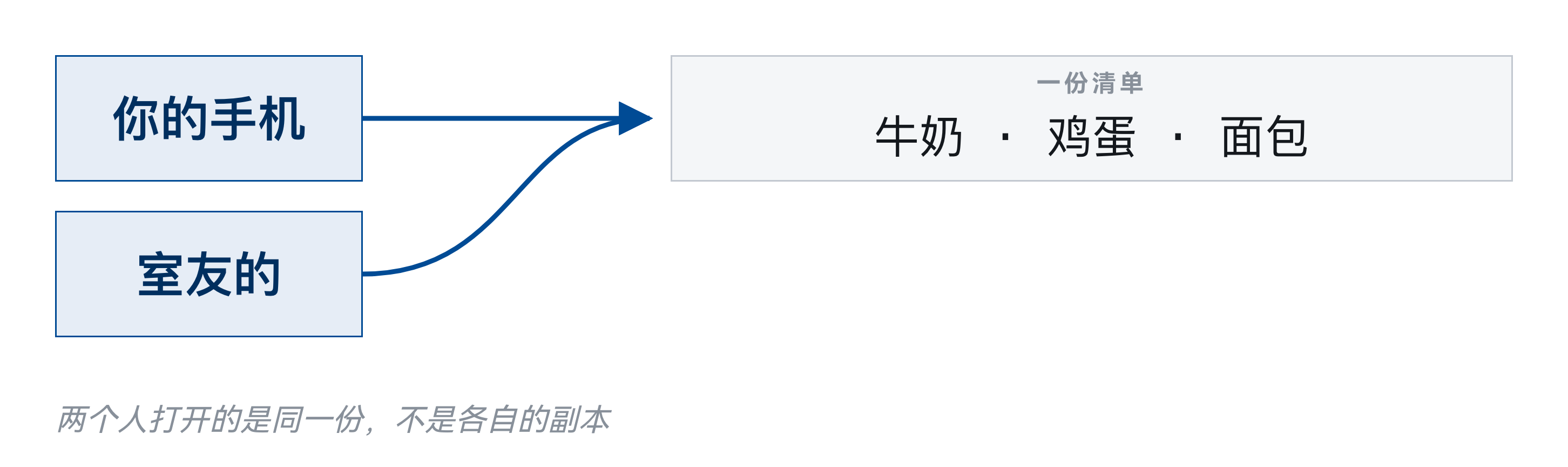
你们看的是同一份清单,各自手里的只是一个入口。
4
先说一件和代码无关的事。
你和室友共享一份购物清单。他在自己手机上加了一样「酱油」,你什么都没做,打开一看,你的清单上也多了一样。
这件事一点也不奇怪,因为你们看的是同一份清单,各自手机上的只是一个入口,不是各自的副本。记住这个场景——等下同样的事情在 Python 里发生时,很多人会觉得莫名其妙。
Now look at two snippets
A
x = 1
x2 = x
x2 = x2 + 1

print(x)
B
nums = [1]
nums2 = nums
nums2.append(1)

print(nums)
两段代码结构完全相同。打印出来会一样吗?
5
现在看两段代码,它们的结构一模一样:定义一个东西,把它赋给第二个名字,通过第二个名字做修改,再打印第一个。
左边操作的是整数 x,右边操作的是列表 nums。
左边打印 1,这一点几乎所有人都同意。右边打印什么?这一页不给答案——你先在心里定一个,等讲完别名那一节再回来对照。
随堂小测 · 第 1 轮

扫码作答 —— 这一轮一题
1B 打印出什么?
这一题现在不公布答案。讲到别名与拷贝那一节再回来。
https://taohuang.info/cs1602/zh/quiz/5
6
开场先收一道题,不公布。等讲完别名与拷贝,再把这一轮的分布放出来对照。
第 1 题就是刚才那个问题。
扫码作答,今天暂时不公布答案。等讲到别名那一节,我会回到这里把全班的分布放出来,那时候你自己就知道答案了。
现在选错没有关系——这道题的作用是让你先形成一个判断,有了判断,后面的解释才有落点。
今天
Why did b change when I only touched a?
A shared shopping list, in code.
7
这一讲从头到尾在回答一个问题:我只动了 b,为什么 a 也变了?
答案和刚才那份共享购物清单是同一回事,只是发生在代码里。在此之前,我们要先把列表本身讲清楚:怎么建、怎么取、怎么改、怎么切。
AI policy — Level 0: No AI-generated code
- Weeks 1–7
- Do not let an AI write or autocomplete code for you. Turn off AI completion in your editor.
- You may ask an AI to explain a concept, look something up in the docs, or make sense of an error message.
8
第 1 到 7 周执行 AI 政策的第 0 级:不允许 AI 生成或补全代码。请关闭编辑器里的补全功能。
可以用 AI 解释概念、查文档、读报错,但不能让它替你写代码。这七周要建立的是代码直觉和调试能力,这两样只能靠自己写、自己出错、自己排查获得。
每一讲都会放这一页。一学期只说两次的规则等于没有规则。
PART 1 OF 9
Why you need a container
Five scores, five variables — it works
1  score1 = 87
2  score2 = 92
3  score3 = 65
4  score4 = 78
5  score5 = 90
6
7  total = score1 + score2 + score3 + score4 + score5
8  print("average:", total / 5)
Five variables, five names.
10
先看没有列表的时候会怎么写。
五个成绩,五个变量:score1 到 score5。要求平均分,就把五个加起来除以五。代码能跑,逻辑也没错。
这种写法在变量个数很少、而且固定不变的时候是可以接受的。问题出在下一页。
Then the requirements change
- Find the highest score
- if score1 > score2 and score1 > score3 and ... — 100 comparisons
- Drop the lowest one and re-average
- which variable do you delete?
- Read the scores from a file, count unknown until you read it
- you cannot even name the variables in advance
更麻烦的是:写代码的时候,你并不知道会有多少个。
11
现在需求变了,而且是很自然的变化。
如果是五十个成绩呢?你要写五十个变量名,加法要写五十项。如果要求最高分,要写一长串比较。如果要按分数排序,用五十个独立变量几乎没法做。
更关键的一点是:数量往往在写代码的时候还不知道。文件里有多少行、用户会输入多少个数字,这些都要等程序跑起来才清楚。而变量名必须在写代码时就定下来。
所以需要的不是更多变量,而是一个能装一批值、并且数量可以在运行时决定的东西。
The list 列表
One name, any number of values.
1  scores = [87, 92, 65, 78, 90]
2
3  print("count:  ", len(scores))
4  print("avg:  ", sum(scores) / len(scores))
5  print("highest:", max(scores))
One name for the whole batch, however many there are.
12
这个东西就是列表。
一个名字管一批值,多少个都行。取第几个用方括号加下标,求个数用 len,求和用 sum,求平均就是 sum 除以 len。
和上一页对比:五十个成绩和五个成绩,这段代码一个字都不用改。
Data structure 数据结构
- A data structure = how data is represented + what you can do to it
- representation — a list keeps its items in order, numbered from 0
- operations — add, remove, look up, slice, sort
- This course covers four: list, tuple, dict, set
- today is the first, and the one the other three are compared against
数据结构 = 怎么存 + 能对它做什么。
13
列表属于「数据结构」。这个词在这门课里会反复出现,含义是:一种组织数据的方式,附带一组针对它的操作。
组织方式决定了哪些操作快、哪些操作慢,所以选对数据结构往往比优化代码更能解决问题。Part II 的四讲讲的就是四种常见的数据结构和它们各自适合的场景。
PART 2 OF 9
Building a list, and reading it back
Square brackets and commas make a list
1  list1 = ["Hello", "world"]          # two strings
2  list2 = [1, 3, 9, 7]                # four integers
3  list3 = [1.0, 2.0, 3.0, 1e-3]       # four floats
4  mixed = [1, "two", 3.0, True]       # types may be mixed
5  nested = ["I", "am", [1, 2, 3]]     # a list inside a list
方括号,逗号分隔。写成
{} 或者用分号都不行。15
列表的字面量写法是方括号加逗号。
里面可以是整数、浮点数、字符串,也可以是另一个列表。空列表就是一对空方括号。
注意逗号是分隔符,最后一项后面可以多写一个逗号,Python 不介意——这在列表要分多行写的时候很有用,加一项只需要加一行,不用改上一行。
Whatever is inside, the type is list
type and len
1  list1 = ["Hello", "world"]
2  list3 = [1.0, 2.0, 3.0, 1e-3]
3  nested = ["I", "am", [1, 2, 3]]
4
5  print(type(list1), len(list1))
6  print(type(list3), len(list3))
7  print(type(nested), len(nested))
output
<class 'list'> 2
<class 'list'> 4
<class 'list'> 3
nested has length 3. The inner list counts as one item.16
不管里面装的是什么,列表本身的类型都是 list。
type 告诉你一个东西是什么类型,len 告诉你它有几项。注意最后一个例子:nested 里面有一个列表,但 len 数出来是 3——里面那个列表整个算一项,不会被展开。
这一点在处理嵌套结构时经常被弄错。
The list() constructor 构造函数
list()
1  print(list("Python"))    # split up
2  print(list(range(5)))    # a range
3  print(list(range(2, 11, 3)))
4  print(list())             # empty
output
['P', 'y', 't', 'h', 'o', 'n']
[0, 1, 2, 3, 4]
[2, 5, 8]
[]
Anything you can take items out of one by one can go through
list(). Such a thing is called an iterable 可迭代对象.17
除了字面量,还可以用 list() 来构造。
list() 不带参数得到空列表。带一个字符串,会把字符串拆成一个个字符——这是因为字符串本身就是可以逐项取出的。带一个 range,会把 range 展开成实际的列表。
range 本身不是列表,它只在需要的时候逐个产生数字,所以 print(range(5)) 打印出来的不是 [0,1,2,3,4]。要看到内容就用 list 包一层。
Items are numbered from 0
A list is ordered. Each item is found by its index.
1  a = ["red", "green", "blue", "yellow"]
2
3  print(a[0])      # red      — the first
4  print(a[1])      # green
5  print(a[3])      # yellow   — the last, len(a) - 1
下标从 0 起。最后一项是
len(a) - 1,写 len(a) 就越界。18
取第几个用方括号。下标从 0 开始,不是从 1 开始。
第一项是 a[0],第二项是 a[1],最后一项是 a[len(a)-1]。这个约定在几乎所有编程语言里都一样,理由和历史上下标表示「距离开头有多远」有关:第一项距离开头 0 个位置。
从 0 开始是新手最容易出错的地方之一。凡是涉及「第几个」的循环,写完先用一个三四项的小列表试一遍边界。
A negative index counts back from the end
negative index
1  a = ["red", "green", "blue", "yellow"]
2
3  print(a[-1])     # the last item
4  print(a[-2])     # the one before it
5  print(a[-len(a)])  # same as a[0]
output
yellow
blue
red
a[-1] is the last item; negative indices count back from the end.19
负数下标从末尾往前数。a[-1] 是最后一项,a[-2] 是倒数第二项。
这个写法很常用,因为取最后一项不需要先知道长度。对比一下:a[len(a)-1] 和 a[-1] 结果相同,后者更短也更不容易写错。
注意负数下标是从 -1 开始的,没有 -0——因为 -0 和 0 是同一个数,那会是第一项。
Out of range raises IndexError
what you will see, a lot
1  a = ["red", "green", "blue", "yellow"]
2  print(a[4])
traceback
Traceback (most recent call last):
  File "example.py", line 2, in <module>
    print(a[4])
          ~^^^
IndexError: list index out of range
IndexError 是最常见的错误之一。 遇到它,先确认列表的长度。
20
下标越界会报 IndexError。
一个有 6 项的列表,合法的下标是 0 到 5,以及 -1 到 -6。写 a[6] 就会出错,报错信息是 list index out of range。
这是好事:它在出错的地方立刻停下,而不是给你一个错误的值继续往下跑。记住这个行为,因为下一节的切片不是这样——切片越界不报错,这个差别坑过很多人。
in and not in ask whether it is there
membership
1  fruit = ["apple", "pear", "banana"]
2
3  print("apple" in fruit)
4  print("durian" in fruit)
5  print("durian" not in fruit)
6  print([1, 2] in [1, 2, 3])   # an ITEM?
output
True
False
True
False
最后一行是
False。in 比较的是元素,不是片段。21
in 判断一个值在不在列表里,not in 反过来。结果是 True 或 False。
它比自己写循环去比对简洁得多,而且意图更清楚。
有一点要注意:in 判断的是「值相等」,不是「同一个对象」。两个内容相同的列表互相比较,in 也会认为存在。
另外,对列表用 in 需要从头扫到尾,列表越长越慢。第 6 讲会讲到集合,那里的 in 几乎和长度无关。
PART 3 OF 9
Walking through a list
for x in a gives you the item itself
for-in
1  fruit = ["apple", "orange", "pear"]
2
3  for x in fruit:
4      print(x, "has", len(x), "letters")
output
apple has 5 letters
orange has 6 letters
pear has 4 letters
Lists, strings, tuples and dicts can all be walked this way. Collectively: iterables.
23
遍历列表最直接的写法是 for x in a。
每一轮循环,x 会依次取到列表里的一项。注意 x 拿到的是元素本身,不是下标——这和 C 或 Java 里习惯的「用下标循环」不一样。
如果你只需要每一项的值,这就是最好的写法:短、清楚、不会下标越界。
One loop, two ways to write it
INDEX BY HAND
i = 0
while i < len(fruit):
    print(fruit[i])
    i += 1
PYTHONIC
for x in fruit:
    print(x)
Both do the same job. The right one removes three chances to get it wrong: the start, the end, and
i += 1.24
同一个循环的两种写法,放在一起对比。
左边用下标:先生成 0 到 len(a)-1,再用 a[i] 取值。右边直接遍历元素。两种写法结果一样,右边更简洁,也不可能下标越界。
什么时候必须用左边那种?当你需要知道「这是第几项」的时候。但即使那样,也有更好的写法——下一页。
Need the index too? Use enumerate
enumerate
1  fruit = ["apple", "orange", "pear"]
2
3  for i, x in enumerate(fruit):
4      print(i, x)
output
0 apple
1 orange
2 pear
When you need the index, reach for
enumerate — not for i in range(len(a)).25
既要元素又要下标时,用 enumerate。
它每一轮返回两个东西:下标和元素,所以循环变量写成 for i, x in enumerate(a)。
对比上一页用 range(len(a)) 再取 a[i] 的写法,enumerate 更短,而且不会出现「下标和列表对不上」的问题。
如果想让编号从 1 开始,可以写 enumerate(a, 1),这在打印给人看的清单时很常用。
PART 4 OF 9 · THE KEY SECTION
So what is a list, really?
An array 数组: same type, laid out end to end
- Every item is the same type, so every item takes the same number of bytes
- The items sit in consecutive memory, one after another
- So the address of item i is: start + size x i
- one multiplication and one addition — the computer jumps straight there
下标从 0 起的理由在这里:第 0 项的地址就是起始地址。
27
这里要解释一个容易混淆的词:数组。
在 C、Java 这些语言里,数组是一段连续的内存,里面的每一项类型相同、大小相同,所以可以直接按下标算出地址,取第几项的速度和位置无关。
Python 的列表不是这样。它更灵活,代价是内部结构更复杂。下一页说明区别在哪。
But a Python list holds anything at all
These have completely different sizes. The array trick cannot work.
1  mixed = [4, "a", 3.14, True, [1, 2], None]
2
3  for x in mixed:
4      print(type(x).__name__, end="  ")
Different sizes means the address cannot be computed. So how does Python manage it?
28
Python 的列表可以装任何东西,而且同一个列表里可以混着放:整数、字符串、浮点数、甚至另一个列表。
这在 C 的数组里是做不到的——那里所有元素必须是同一种类型。
问题来了:既然元素大小不一样,Python 怎么还能按下标快速取到第几项?答案在下一页,而它也正是这一讲后半程所有「意外」的根源。
A list stores addresses, not data
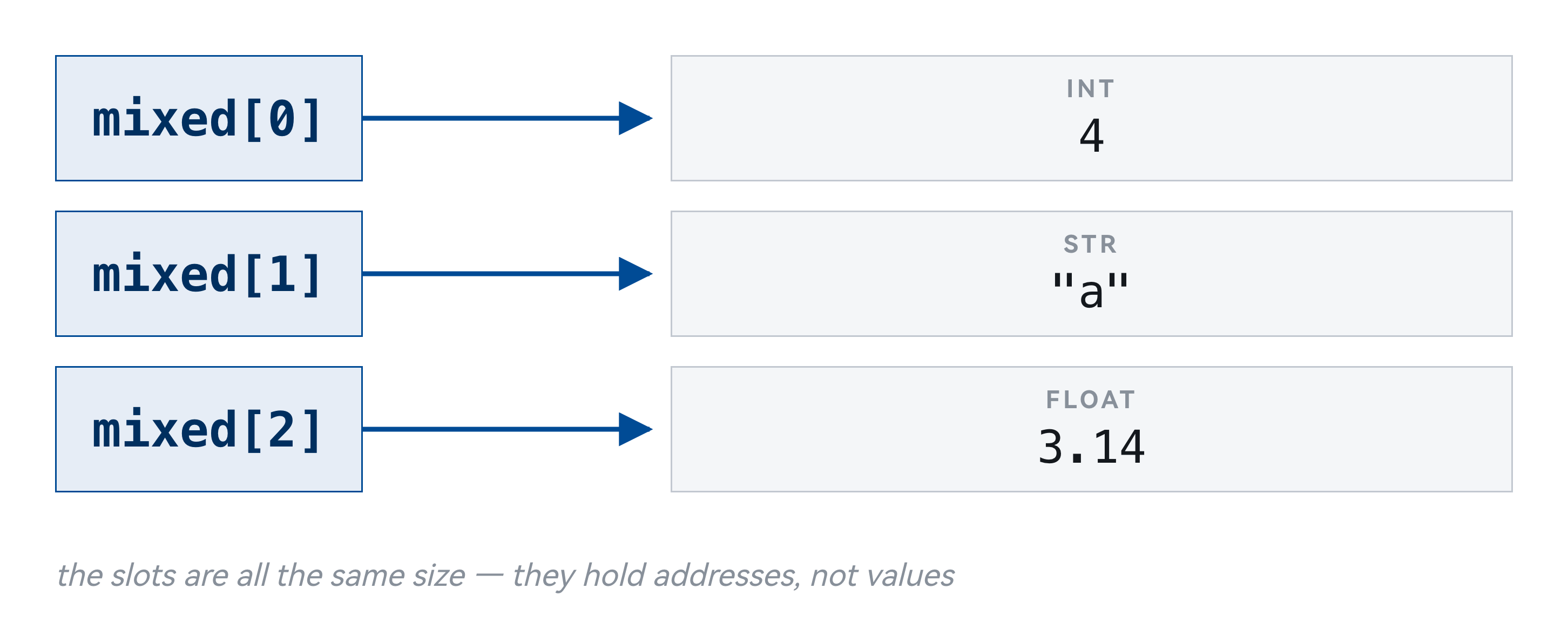
An address is a fixed size. So the array holding the addresses is uniform after all.
29
关键在于:列表里存的不是数据本身,而是数据的地址。
无论元素是一个小整数还是一个很长的字符串,列表格子里放的都是一个固定大小的地址。所以格子大小统一,按下标取值依然很快;同时元素类型可以随意,因为真正的数据放在别处。
这个设计解释了三件事:为什么列表能装混合类型、为什么两个名字可以指向同一个列表、以及为什么拷贝一个列表时「里面那一层」不会跟着复制。后面两条马上就会遇到。
Which makes this legal, if strange
Each slot holds an address; that address may point at another list.
1  deep = [[[[[[1]]]]]]
2
3  print(deep[0][0][0][0][0][0])
4  print(len(deep))
An address can point at a list of addresses, and so on down.
30
因为存的是地址,所以这样写完全合法:一个列表里同时放整数、字符串和另一个列表。
能这么写不代表应该这么写。混合类型的列表在处理时很麻烦——你没法对它统一做加法,也没法直接排序。实际写代码时,一个列表通常应该装同一类东西。
id() gives you that address
id()
1  a = [1, 2, 3]
2  print("id of a: ", id(a))
3  print("id of a[0]:", id(a[0]))
4
5  b = a
6  print("id of b: ", id(b))
7  print("a is b:  ", a is b)
output
id of a:  4312602432
id of a[0]: 4324107032
id of b:  4312602432
a is b:   True
id(x) is where x lives. The number differs every run; which ones match does not.31
id() 返回一个对象的身份标识,在 CPython 里就是它的内存地址。
这个函数平时不用,但它是观察「两个名字是不是指向同一个东西」最直接的工具:id 相同就是同一个对象,不同就是两个对象。
接下来几页会反复用它来验证,而不是靠猜。
PART 5 OF 9
Changing a list
A list is mutable: you change it in place
mutable
1  a = [1, 2, 3]
2  print("before:", a, id(a))
3
4  a[0] = 99
5  print("after: ", a, id(a))
output
before: [1, 2, 3] 4369422144
after:  [99, 2, 3] 4369422144
内容变了,地址没变。这就是「修改」。
33
列表是可变的:你可以在不换对象的前提下改动它的内容。
看这段代码的输出:改动前后,列表的内容变了,但 id 没变。也就是说,还是同一个列表,只是里面第 0 项换了。
这一点和字符串正相反。字符串是不可变的,s[0] = 'x' 会直接报错,任何「修改」字符串的操作实际上都在造一个新字符串。这个区别在第 6 讲会正式对比。
append adds one item at the end
append
1  a = [1, 2, 3]
2  a.append(4)
3  print(a)
4
5  a.append([5, 6])   # ONE item, a list
6  print(a)
7  print(len(a))
output
[1, 2, 3, 4]
[1, 2, 3, 4, [5, 6]]
5
append 一次只加一项。传进去的是列表,那也只算一项。34
append 在末尾加一项。
注意它加的是「一项」:如果你传进去一个列表,那整个列表会作为一项被放进去,而不是把里面的元素铺开。
同样注意 id 没变——append 是在原列表上改,不是造一个新列表。这一点决定了它和下一页的 + 有本质区别。
append, extend and + are three different things
append — ONE item
a = [1, 2]
a.append([3, 4])
print(a)
print(len(a))
output
[1, 2, [3, 4]]
3
extend — EACH item
a = [1, 2]
a.extend([3, 4])
print(a)
print(len(a))
output
[1, 2, 3, 4]
4
append 加一项,extend 逐项加,a + b 也逐项,但另造一个新列表。35
把三种「加东西」的方式放在一起对比,这是这一节的重点。
append 加一项,传进去的东西整个作为一个元素。extend 把参数里的每一项分别加进来,所以传一个三元素的列表会多出三项。加号造一个新列表,原来的两个都不变。
记法:append 和 extend 都在原地改,加号不改原来的。选哪个取决于你想不想保留原列表。
a + b builds a new list; extend does not
in place or not
1  a = [1, 2]
2  print("a starts at", id(a))
3
4  a.extend([3, 4])
5  print("extend", id(a))   # same list
6
7  a = a + [5, 6]
8  print("plus  ", id(a))   # a new one
output
a starts at 4308817728
extend 4308817728
plus   4392368384
Changed in place, or newly built? Today keeps coming back to that.
36
这一页用 id 验证上一页的说法。
a + b 之后,结果的 id 和 a 不同——说明它是一个新列表,a 本身没变。a.extend(b) 之后,a 的 id 不变——说明是在原列表上加。
这个差别在函数里尤其要紧:如果你把一个列表传进函数,函数里用 extend,调用方的列表会跟着变;用加号则不会。第 4 讲讲函数时提到的「副作用」,这里是最典型的一例。
Every in-place method returns None
what do they return?
1  a = [3, 1, 2]
2
3  print(a.append(4))
4  print(a.sort())
5  print(a.reverse())
6  print(a.insert(0, 9))
7  print(a)          # but a DID change
output
None
None
None
None
[9, 4, 3, 2, 1]
全是
None。 改的就是原列表,没有新对象可以返回。37
所有原地修改的方法都返回 None。
append、extend、sort、reverse、insert、remove 都是如此。它们的工作是改动原对象,没有东西可返回,Python 就统一返回 None。
这个设计是有意的:如果 append 返回列表本身,你就无法从返回值判断这个方法到底改没改原对象。统一返回 None,等于在语法层面提醒你「这是原地操作」。
Which makes a = a.append(x) a bug
错
a = [1, 2, 3]
a = a.append(4)
print(a)
# a is None; list lost
对
a = [1, 2, 3]
a.append(4)
print(a)
# [1, 2, 3, 4]
append added the 4, then returned None — and that None was bound back to a. sort, reverse, remove, insert: all the same.In-place methods return
None. The ones that return a new object leave the original alone.38
上一页那条规则会以这个形式坑人:a = a.append(x)。
写的人以为「把 x 加进去,再把结果赋回给 a」。实际发生的是:append 先把 x 加进列表(这一步是对的),然后返回 None,接着 None 被赋给了 a。于是 a 从一个列表变成了 None,原来的列表反而丢了。
而且这个错误不会当场报错,要等到下一次用 a 的时候才炸,报错信息还指向别的地方。这类「错在这里、炸在那里」的问题最难查。
正确写法就是 a.append(x),不要赋值。
The in-place family
- append(x) · insert(i, x) · extend(it) · remove(x) · sort() · reverse() · clear()
- all change the list itself, all return None
- pop(i) is the exception — it removes AND hands the item back
- so x = a.pop() is correct, and useful
- sorted(a) · reversed(a) · a + b · a[:] build something new instead
写成
a = a.append(x),a 就变成了 None,原来的列表反而丢了。39
原地修改的方法可以归成一族,记住它们的共同点比记住每一个更有用。
append 加一项,extend 加一批,insert 在指定位置插入,remove 按值删除第一个匹配项,pop 按下标取出并删除,sort 排序,reverse 反转,clear 清空。
这些方法都改原对象、都返回 None。其中 pop 是唯一的例外——它返回被取出的那一项,因为那确实是有用的东西。
如果你要的是「排好序的新列表而不动原来的」,用 sorted(a);要「反转的新列表」,用 a[::-1] 或 list(reversed(a))。
PART 6 OF 9
Slicing 切片
a[i:j] takes i up to j, but not j
slice
1  a = [10, 20, 30, 40, 50, 60]
2
3  print(a[1:4])
4  print(a[0:3])
5  print(a[:3])      # 0 can be omitted
6  print(a[2:])     # end omitted
7  print(a[:])       # both — the whole list
output
[20, 30, 40]
[10, 20, 30]
[10, 20, 30]
[30, 40, 50, 60]
[10, 20, 30, 40, 50, 60]
左闭右开。
a[1:4] 取的是第 1、2、3 项,不含第 4 项,长度是 4−1。41
切片用 a[i:j],取从第 i 项到第 j 项,但不包含第 j 项。
这叫左闭右开。它有一个好处:切出来的长度正好是 j 减 i,不用做加一减一的调整。另一个好处是 a[:i] 和 a[i:] 正好把列表分成两段,不重不漏。
开头的 0 可以省略,结尾省略表示到末尾,两个都省略就是整个列表。
a[start:stop:step] adds a stride
step
1  a = [10, 20, 30, 40, 50, 60]
2
3  print(a[::2])      # every other one
4  print(a[1::2])
5  print(a[::-1])    # backwards
output
[10, 30, 50]
[20, 40, 60]
[60, 50, 40, 30, 20, 10]
a[::-1] gives a reversed copy. Worth committing to memory.42
在冒号后面再加一个冒号可以指定步长:a[start:stop:step]。
a[::2] 每隔一个取一个,a[1::2] 从第二项开始每隔一个取一个。
a[::-1] 步长为负,等于把列表倒过来。这个写法很常见,值得记住。注意它造的是一个新列表,和 a.reverse() 不同——后者在原地反转、返回 None。
Drag the three cursors; watch the cells light up
a[1:4]
0
10
-6
1
20
-5
2
30
-4
3
40
-3
4
50
-2
5
60
-1
→ [20, 30, 40]
start
1
stop
4
step
—
The
stop cell stays dark. That is what half-open means.43
这一页可以自己动手。拖动下面三个游标,上面亮起来的格子就是切出来的部分,右边显示结果。
先试一件事:把 stop 拖到 4,看看第 4 格亮不亮。它不亮——这就是左闭右开。
再试第二件事:把 stop 拖到 9。这个列表只有 6 项,切到 9 却什么错都不报,只是给你到末尾为止的部分。这是下一页要讲的内容,先在这里看见它。
最后把 step 拖到 -1,看看发生什么。
(导出的 PDF 上是静态的一帧,要拖动请到课程网站的课件页。)
A slice never complains about going too far
no IndexError
1  a = [10, 20, 30]
2
3  print(a[1])        # fine
4  print(a[1:99])     # no error
5  print(a[99:])      # empty, no error
6  print(a[5:2])      # also empty
output
20
[20, 30]
[]
[]
切片不会因为越界而报错,它会安静地返回一个较短的列表或空列表。
44
切片越界不报错。
上面刚讲过 a[6] 会抛 IndexError,但 a[1:99] 不会——它安安静静地给你从第 1 项到末尾的部分。甚至 a[99:] 也不报错,只是返回一个空列表。
这个设计在很多场合很方便,比如取「前十项,不足十项就有多少给多少」,直接写 a[:10] 就行,不用先判断长度。
但它也意味着:切片写错了不会当场告诉你,你会拿到一个空列表或者少几项的结果,然后在后面某个地方才发现不对。不报错不等于对——这句话在第 12 讲讲编码时还会再说一次。
You can assign to a slice
slice assignment
1  a = [1, 2, 3, 4, 5]
2  a[1:3] = [20, 30]        # same length
3  print(a)
4  a[1:3] = [7, 7, 7, 7]   # length may differ
5  print(a)
6  a[1:5] = []             # deletes
7  print(a)
output
[1, 20, 30, 4, 5]
[1, 7, 7, 7, 7, 4, 5]
[1, 4, 5]
The right side of a slice assignment must be iterable —
a[1:3] = 20 raises.45
切片不仅能读,还能赋值。
a[1:3] = [20, 30] 把第 1、2 项换成新的两项。有意思的是两边长度不必相等:a[1:3] = [7,7,7,7] 会用四项替换掉两项,列表因此变长。赋一个空列表则等于删除那一段。
注意右边必须是一个可迭代的东西,a[1:3] = 20 会报错,因为 20 不能被逐项取出。
A slice always builds a new list
is vs ==
1  a = [1, 2, 3]
2  b = a          # the same list
3  c = a[:]       # a NEW list, same items
4
5  print("a is b:", a is b)
6  print("a is c:", a is c)
7  print("a == c:", a == c)
output
a is b: True
a is c: False
a == c: True
== 比较内容,is 比较是否为同一个对象。这两者不能混用。46
切片总是造一个新列表。
看 id:切片结果和原列表的 id 不同。所以 a[:] 是一个常见的写法,意思是「整个切一份」,得到一个内容相同但独立的新列表。
这一点马上会用到——它是拷贝列表最短的写法之一。
And slicing is fast
copying 2,000,000 items
1  from time import perf_counter as now
2  f = list(range(2_000_000))
3
4  t = now(); g = [x for x in f]; loop = now() - t
5  t = now(); h = f[:];           sl = now() - t
6
7  print(f"loop {loop*1000:5.1f} ms")
8  print(f"a[:] {sl*1000:5.1f} ms")
output
loop   8.7 ms
a[:]   2.6 ms
To copy a whole list,
a[:] is about three times faster than a loop you write yourself.47
切片比自己写循环快。
片子上这个测量是构建时真实跑出来的:同样是复制一个列表,切片比 for 循环加 append 快大约三倍。
原因是切片在 C 那一层一次性完成,而循环每一轮都要回到 Python 解释器执行一次 append。
但请注意一点:这是常数倍的差别,不是数量级的差别。两种写法处理 n 项都需要正比于 n 的时间。真正能带来数量级差别的是换算法,不是换写法——第 11 讲会讲这件事。
PART 7 OF 9 · TODAY IS RIGHT HERE
Two names, one list
Back to the opening question
x2 = x2 + 1 左边没变,nums2.append(1) 右边变了。
The same thing as that shared shopping list.
49
现在回到开场那个问题。
b = a 到底做了什么?答案是:它复制的是箭头,不是列表。赋值只是让第二个名字指向同一个对象,并没有产生新的列表。
这就是那份共享购物清单:两个入口,一份清单。通过任何一个入口修改,另一个入口看到的都是修改后的结果。
b = a copies the arrow, not the list
aliasing
1  a = [1, 2, 3]
2  b = a          # the SAME list
3
4  b.append(4)
5
6  print("a =", a)
7  print("b =", b)
8  print("same object?", a is b)
output
a = [1, 2, 3, 4]
b = [1, 2, 3, 4]
same object? True
b = a 复制的是箭头。 a 和 b 是同一个列表的两个名字。50
用 id 验证:b = a 之后,a 和 b 的 id 相同,说明它们是同一个对象。
所以 b.append(4) 之后 a 也变成了四项——因为根本就只有一个列表。
One list, two names
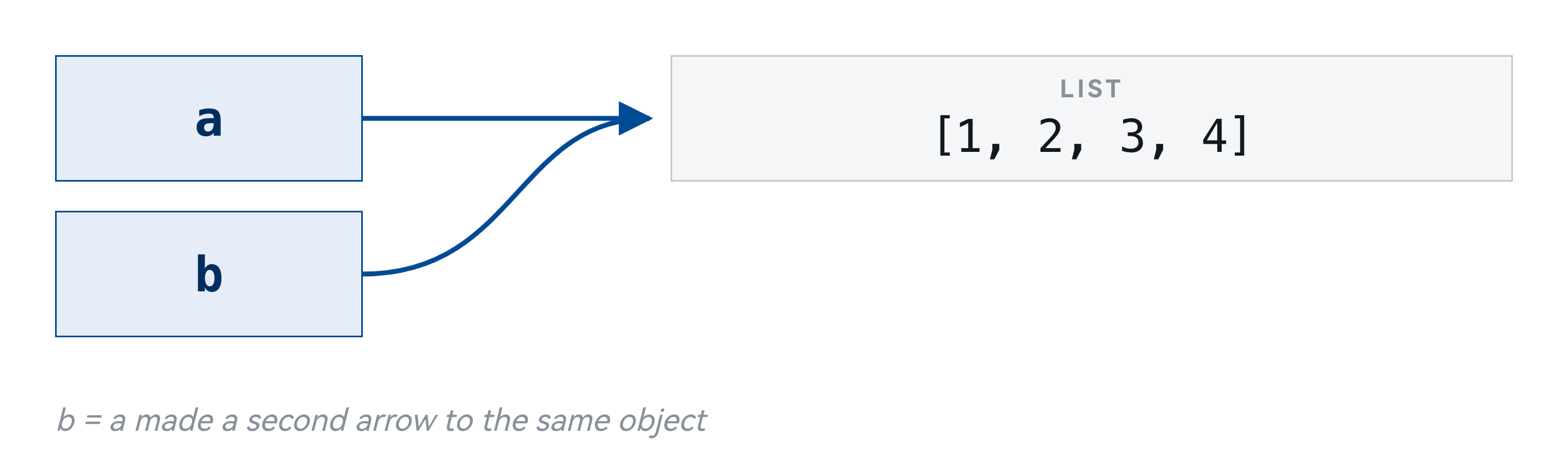
The reason it works this way: lists can be huge, and copying one on every assignment would cost far too much.
51
画成图更清楚:两个名字,两支箭头,指向同一个列表。
赋值语句 b = a 做的事情是「让 b 也指向 a 指的那个东西」,而不是「把 a 的内容抄一份给 b」。
这个模型对后面所有可变类型都适用——字典、集合、以及第 9 讲自定义的类,规则完全一样。现在花时间把它想清楚,后面会省下很多调试时间。
Mutating, or rebinding
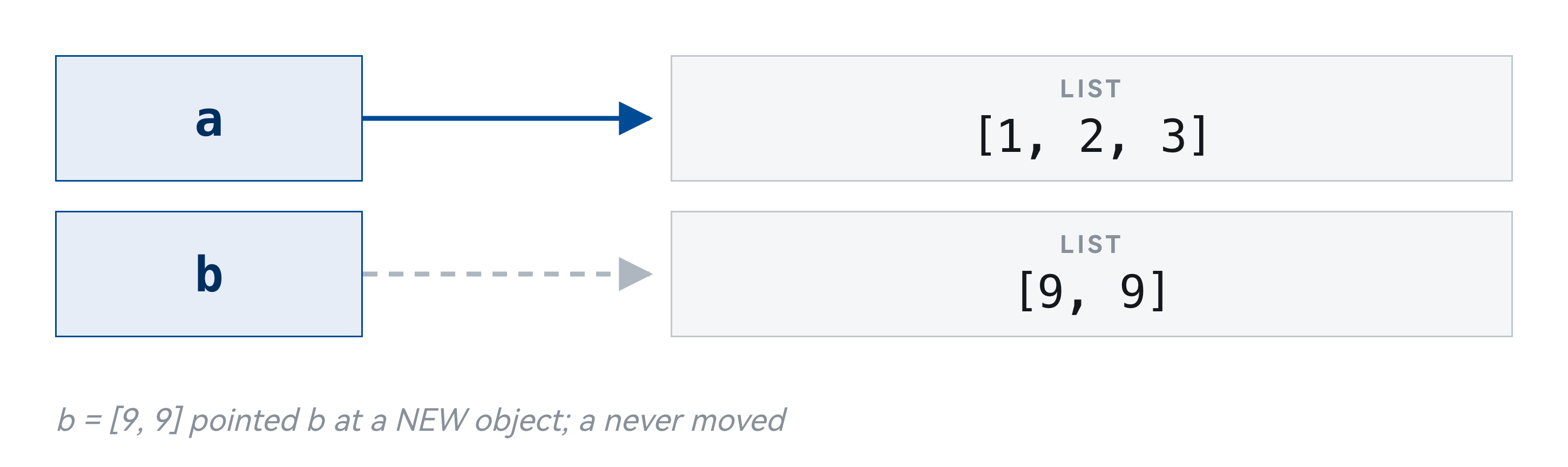
b.append(4) 修改对象,b = [9, 9] 重新绑定。前者影响 a,后者不会。52
这里要区分两件容易混淆的事:修改和重新绑定。
b.append(4) 是修改:动的是列表本身,a 和 b 指的还是同一个对象,所以 a 看得到这个改动。
b = [9, 9] 是重新绑定:它没有动原来的列表,只是让 b 改指向一个新列表。a 仍然指着老的那个,因此 a 不受影响。
判断办法很简单:看等号左边。左边是一个纯变量名,那是重新绑定;左边带方括号或者调用的是方法,那是修改。
Getting a copy of your own
copying
1  a = [1, 2, 3]
2  b = a[:]       # slice
3  c = a.copy()   # clearest
4  d = list(a)    # constructor
5  a.append(99)
6
7  print("a =", a)
8  print("b =", b)
9  print("c =", c)
output
a = [1, 2, 3, 99]
b = [1, 2, 3]
c = [1, 2, 3]
Three ways to get a copy of your own:
a[:], a.copy(), list(a).53
要得到一个独立的副本,有三种等价的写法:a.copy()、a[:]、list(a)。
三者都造一个新列表,之后改动其中一个不会影响另一个。用哪个看习惯,a.copy() 意图最明显。
但下一页会说明,这种拷贝只解决了一半问题。
But a copy goes only one level deep
shallow copy
1  a = [[1, 2], [3, 4]]
2  b = a.copy()
3
4  b[0][0] = 99      # reaching INSIDE
5
6  print("a =", a)
7  print("b =", b)
8  print("a[0] is b[0]:", a[0] is b[0])
output
a = [[99, 2], [3, 4]]
b = [[99, 2], [3, 4]]
a[0] is b[0]: True
The outer level was copied; the inner level was not. This is a shallow copy 浅拷贝.
54
拷贝只复制最外面那一层。
如果列表里装的是另一个列表,那么复制出来的新列表里,存的仍然是指向同一个内层列表的地址。也就是说,外层是两个了,内层还是共享的。
所以改 b[0][0] 的时候,a[0][0] 也跟着变。这叫浅拷贝——它拷贝了箭头,没有拷贝箭头指向的东西。
这是这一讲最容易出错的地方,也是最难自己发现的地方,因为程序不会报错,只会给出一个你没预料到的结果。
Deep copy 深拷贝
- copy() duplicates one level. The nested objects are still shared.
- copy.deepcopy() follows the whole chain of addresses and duplicates all of it.
- import copy → d = copy.deepcopy(a)
- 浅拷贝复制的是外层那一排格子,格子里的地址原样搬过去,所以内层对象仍然是共用的。
- 深拷贝沿着每一个地址往下走,把每一层都复制一份,得到的结构和原来完全独立。
copy duplicates one level; deepcopy follows the chain of addresses all the way down.55
要连内层一起复制,用 copy 模块的 deepcopy。
深拷贝会递归地把每一层都复制一遍,所以得到的新结构和原来完全独立,改哪一层都互不影响。
代价是慢,而且如果结构里有循环引用需要额外处理(deepcopy 自己能处理)。所以不要养成一律用 deepcopy 的习惯:只装基本类型的列表,浅拷贝就够了。
deepcopy, checked
copy vs deepcopy
1  import copy
2  a = [[1, 2], [3, 4]]
3  shallow = a.copy()
4  deep = copy.deepcopy(a)
5
6  a[0][0] = 99
7  print("a       =", a)
8  print("shallow =", shallow)   # followed
9  print("deep    =", deep)      # separate
output
a       = [[99, 2], [3, 4]]
shallow = [[99, 2], [3, 4]]
deep    = [[1, 2], [3, 4]]
嵌套结构要备份,只有
deepcopy 是可靠的。56
用代码验证:改动 a 里面那个嵌套列表之后,shallow 跟着变了,deep 没有变。
三行输出并排放在一起,差别一眼就能看到。遇到「明明只改了一个却两个都变了」的情况,回来看这一页。
A Grid Built With *
[[0]*3]*3
1  grid = [[0] * 3] * 3     # looks fine
2  grid[0][0] = 1
3  print(grid)
4
5  good = [[0] * 3 for _ in range(3)]
6  good[0][0] = 1
7  print(good)
output
[[1, 0, 0], [1, 0, 0], [1, 0, 0]]
[[1, 0, 0], [0, 0, 0], [0, 0, 0]]
* 3 复制的是三个箭头,都指向同一行。改一行等于改三行。57
这是嵌套列表最经典的一个事故:用乘法造二维表格。
[[0] * 3] * 3 看起来是「三行三列的零」,打印出来也确实是 [[0,0,0],[0,0,0],[0,0,0]]。但把 grid[0][0] 改成 1 之后,三行的第一个元素全变成了 1。
原因是外层的乘法只是把同一个内层列表的地址重复了三次,所以三行其实是同一行。
正确写法是用列表推导:[[0] * 3 for _ in range(3)]。这里每一轮循环都会执行一次 [0] * 3,因此产生三个不同的列表。
内层的 [0] * 3 为什么没问题?因为 0 是整数,不可变,共享同一个 0 不会造成任何后果。问题只出在可变对象上。
Three minutes with the person next to you
一个函数接收一个列表作为参数。你想在函数内部排序,但不希望调用方的那个列表被改动。应该怎么写?
Two answers are correct here. Find both.
58
花三分钟和旁边的同学讨论一下这个问题。
讨论比自己想更有效,因为你需要把想法说出来——而说不清楚通常意味着还没想明白。
这也是之后团队项目的基本工作方式。
PART 8 OF 9
Deleting while you iterate
This looks right. It is not.
one 2 survives
1  a = [1, 2, 2, 3]
2
3  for x in a:
4      if x == 2:
5          a.remove(x)
6
7  print(a)
output
[1, 2, 3]
Remove an item and everything after it shifts left, while the index keeps climbing — so the second 2 is skipped.
60
这段代码看起来对,实际不对:一边遍历列表一边删除元素。
问题在于删除会让后面的元素往前挪一位,而循环的内部计数器仍然照常往后走,于是每删一个就会跳过一个。结果是有些该删的没被删掉。
这个错误的特点是「有时候看起来是对的」:如果要删的元素不相邻,可能恰好没问题;一旦相邻,就漏。这种时对时错的 bug 比稳定出错的更难查。
Three ways that actually work
# 1. build a new list — clearest
a = [x for x in a if x != 2]

# 2. loop over a copy, delete from the original
for x in a[:]:
    if x == 2:
        a.remove(x)

# 3. mark instead of delete, clean up afterwards
a = [None if x == 2 else x for x in a]
不要一边遍历一边删除。 新建一个列表最清楚,也最不容易出错。
61
三种确实可行的写法。
第一种是建一个新列表,用列表推导把要保留的挑出来。这种写法最清楚,通常也是首选。
第二种是遍历一份拷贝、在原列表上删:for x in a[:] 里的 a[:] 是副本,遍历它的时候改动 a 不会影响循环。
第三种是先标记后清理:先把要删的位置标出来,遍历结束后统一处理。
一般情况下用第一种。记住这条规则:不要在遍历一个列表的同时修改它的长度。
PART 9 OF 9
List comprehension 列表推导
The same thing, four lines shorter
WITH A LOOP
squares = []
for x in range(10):
    squares.append(x**2)
print(squares)
WITH A COMPREHENSION
squares = [x**2 for x in range(10)]
print(squares)
Read it left to right: for every
x in range(10), take x².63
同一件事的两种写法:左边用循环,右边用列表推导。
右边这行的读法是从左往右念:「对 range(10) 里的每一个 x,取 x 的平方」。先会读,再会写。
推导式不是必需的语法,任何推导式都能改写成循环。它的价值在于把「造一个新列表」这件事表达成一行,读的人一眼就知道结果是一个列表。
The shape of a comprehension
- [ expression for target in iterable if condition ]
- expression — what to put in the new list
- for ... in — where the values come from
- if ... — optional, keeps only the ones that pass
- The result is always a NEW list. The source is untouched.
Three parts: what to take · where from · which ones.
64
列表推导的结构固定:方括号里放三部分——表达式、for 目标 in 可迭代对象、可选的 if 条件。
执行顺序和书写顺序不同:先跑 for,再判断 if,最后算表达式。所以读的时候先看中间那一段,就知道循环的是什么。
Adding a condition
filtering
1  nums = [3, -1, 4, -1, 5, -9, 2, 6]
2
3  print([x for x in nums if x > 0])
4  print([x * x for x in nums if x > 0])
5  print([abs(x) for x in nums])
output
[3, 4, 5, 2, 6]
[9, 16, 25, 4, 36]
[3, 1, 4, 1, 5, 9, 2, 6]
Filtering and transforming can share a line, but one job per line reads better.
65
加上条件之后,只有满足条件的项才会进入结果。
注意 if 的位置:写在 for 后面是过滤,决定某一项要不要进结果;写在最前面(配 else)是选择,每一项都会进结果,只是取值不同。这两种形式很容易混。
过滤写法里没有 else,因为「不满足就不要」,没有第二个取值。
When not to reach for one
- Two levels of nesting — write the loop instead
- [[y for y in row] for row in grid] is already at the limit
- The expression needs more than one line to understand
- You are doing it for the side effect, not the result
- a comprehension whose value you throw away should be a for loop
推导式的目的是更清楚,不是更短。 写出来不清楚就拆成循环。
66
推导式不是越多越好,有三种情况不该用它。
第一,逻辑复杂到需要嵌套两三层 for 和多个 if 的时候。那时候写成普通循环反而更容易读懂。
第二,循环体里要做的事情不止「算一个值」,比如还要打印、写文件、或者更新别的变量。推导式的用途是造一个新列表,不是执行一串动作。
第三,结果根本用不到的时候。只为了副作用而写一个推导式,会造出一个没人用的列表,白白占内存。
判断标准:写完念一遍,念不顺就改回循环。
随堂小测 · 第 2 轮
扫码作答 —— 这一轮六题
1下标和越界
2append 和 extend 的区别
3就地修改的返回值是什么
4用 * 造矩阵的陷阱
5b = a 和 c = a[:] 的 id
6边遍历边删
今天六个落点各一题。一题一题放,答完一题公布一题。
https://taohuang.info/cs1602/zh/quiz/5
67
第二轮小测,六道题,把今天几段各收一次。我一题一题地放,每题答完当场公布。
第 1 题检查你有没有把下标和边界搞清楚。
这类题的正确做法是在纸上把列表的每一项和它的下标写出来,正数下标写在上面,负数下标写在下面,然后按题目数一遍。凭感觉答很容易差一位。
【第 2 题 · append 和 extend 的区别】
这一题检验 append 和 extend 的区别。
如果选错,回到那一页重新看一遍两者的输出。一个记法是看参数被怎么对待:append 把参数当作一个整体,extend 把参数拆开。
【第 3 题 · 就地修改的返回值是什么】
这一题只有一个考点:就地修改的方法返回 None。
append、extend、sort、reverse、remove、insert 全都如此。它们改的是原来那个列表,没有新东西可以交回来,所以返回 None。
写成 a = a.append(x) 是初学阶段最常见的一个错误:列表确实被改了,但 a 随即被绑到了 None 上,原来那个列表就找不回来了。
【第 4 题 · 用 * 造矩阵的陷阱】
这一题考的就是上一页那个陷阱。
答对了说明你真的理解了「乘法复制的是地址」。答错也没关系,回去把上一页的两种写法各跑一遍,对比 id 的输出,比看讲解更直观。
【第 5 题 · b = a 和 c = a[:] 的 id】
这一题把这一节的两条结论合在一起考:b = a 复制的是箭头,两个名字指向同一个列表,所以 id 相同;c = a[:] 是切片,切片永远造一个新列表,所以 id 不同。
答完这一题,就可以回头看开场那道题了——它问的是同一件事。
【第 6 题 · 边遍历边删】
这一题考边遍历边删。
如果选错,把那段代码在自己机器上跑一遍,在循环里加一行 print 把每一轮的 x 和当前的列表都打出来,跳过是怎么发生的就看得很清楚了。
What to take away
- A list stores addresses, not data — everything today follows from that
- b = a copies the arrow; b = [...] moves the arrow; b.append() changes the object
- In-place methods return None. a = a.append(x) destroys your list.
- a[:] copies one level. Nested data needs copy.deepcopy().
- Never delete from a list you are looping over.
只需要记住一条:列表存放的是地址。
68
这一讲要记住的东西集中在这一页。
列表存的是地址不是数据;b = a 复制的是箭头;切片和 copy 只复制最外层;嵌套结构要用 deepcopy;原地方法返回 None;不要边遍历边删。
其中前两条是根,其余都是它们的推论。如果只能记住一句话,记住:赋值不复制对象。
LAB 5
Lab 5 — 六道题,列表实战
- 5-1 成绩统计(热身)
- 5-2 手写
max—— 不许调内置的那个 - 5-3 有序去重:去掉重复元素但保持原来的先后
- 5-4 矩阵转置
- 5-5 找出并修正 Bug
- 5-6 拷贝实验 —— 今天三个坑的正面交锋
另有 B 段和 C 段(命令行,期末要考)。其中三道是刻意安排的陷阱题 —— 先自己踩进去,再自己爬出来。
69
A 段六道题,覆盖列表的增删改查、切片、拷贝和嵌套结构。
其中三道是刻意安排的陷阱题,对应今天讲过的三个坑:原地方法的返回值、浅拷贝、边遍历边删。先自己踩进去,再自己爬出来,比听讲印象深得多。
5-2 要求手写 max,不许调内置的那个。这类题的意义不在于「重新发明轮子」,而在于逼你把「遍历 + 维护一个当前最好值」这个套路写熟——后面找最小值、找第二大、找出现次数最多的,都是同一个骨架。
5-4 矩阵转置会用到嵌套列表,也是今天那个「用 * 造矩阵」陷阱的正面应用。
A 段之外还有 B 段和 C 段,三段同时开放。C 段是命令行基本功,期末要考。
交到「小作业 2」——它覆盖第 4 到 6 周,10 月 27 日截止。
Next time
A list can do almost everything. So why does Python have three more?
Next time: tuple, dict and set — and the one question that decides which of the four you should reach for.
70
下一讲讲元组、字典、字符串和集合。
列表几乎什么都能做,那为什么 Python 还要另外三种容器?因为「能做」和「适合做」是两回事。下一讲会给你一个判断依据:拿到一个具体问题,该选哪一种。